
If you’ve ever logged into your Demat account and seen the term “CML Copy”, you might have paused and wondered what it really means. For many account holders, understanding these statements can feel confusing, especially when you want a clear view of your transactions.
In this blog, you’ll understand what a CML copy means, why it’s important, and what details it shows. We’ll also walk you through the steps to access or download your CML copy and point out some common issues along with simple ways to fix them.
By the end, handling your CML copy will feel easy and clear!
A Quick Snapshot
CML Copy Meaning: CML stands for Client Master List, a document containing all essential details of your Demat account.
Importance: It helps verify account information, track nominees, and ensure smooth account operations.
Contents: Includes personal details, KYC information, linked bank account, account status, and broker contact info.
Accessing the Copy: Can be downloaded via your broker or DP platform; may require authentication and is usually sent digitally.
Common Issues: Incorrect details, download problems, or mismatched bank info can be resolved by contacting your DP.
What Does “CML Copy” Mean?
A CML Copy stands for Client Master List Copy. It is a document that contains all the essential details of your Demat account maintained with your Depository Participant (DP). This includes information like your name, account number, account type, and linked bank details.
The CML copy is primarily used for record-keeping and verification purposes. Whenever there is a need to confirm your account details or check for discrepancies in transactions, the CML copy serves as an official reference.
Now that you know what a CML copy is, it’s important to understand why having this document matters in managing your Demat account.
Why is the CML Copy Important?
Understanding the importance of a CML copy helps you see why keeping this document accessible can save time, prevent errors, and simplify many account-related processes.
Proof of Account Ownership: The CML copy acts as an official document confirming that you own the Demat account. It contains verified details like your name, PAN, address, and linked bank information.
Transferring Shares: If you need to move shares between different brokers or depositories (for example, from CDSL to NSDL or vice versa), the CML copy is required. It simplifies the process and ensures everything is done legally.
Account Verification for Platforms: Many brokers and financial platforms ask for your CML copy during onboarding or KYC to confirm your Demat account details and maintain compliance.
Avoids Errors and Confusion: Using the CML copy helps prevent mistakes when linking your Demat account to a trading account or transferring shares, making the process smooth and error-free.
For Loan or Tax Purposes: Some financial institutions may request the CML copy to verify your investment portfolio during loan applications or for tax assessments.
With its value clear, it’s helpful to explore the key information a CML copy holds.
Details Included in a CML Copy
A closer look at your CML copy reveals all the important details your Demat account holds, helping you keep track of every key piece of information.
Here’s what you will typically find inside:
Demat Account Details: Your unique Client ID and DP ID that clearly identify your Demat account.
Personal Information: Your name, address, date of birth, email, and phone number registered with your DP.
KYC Details: Verified identity details like your PAN number and Aadhaar number.
Bank Account Information: Details of the bank account linked to your Demat account, including account number and IFSC code.
Nominee Details: Names of any nominees registered for your account.
Account Status: Information about whether your account is active, suspended, or closed.
Client Type: Indicates if you are a resident Indian or a Non-Resident Indian (NRI).
Broker Contact Details: Contact information for your DP or broker if you need any assistance.
Power of Attorney (POA) Details: If applicable, details of any POA authority assigned for your account.
Now that you know what information a CML copy contains, let’s see how you can easily access or download it from your account.
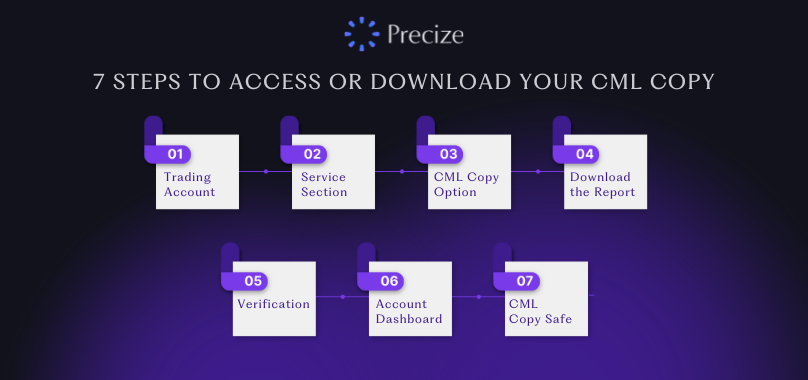
7 Steps to Access or Download Your CML Copy
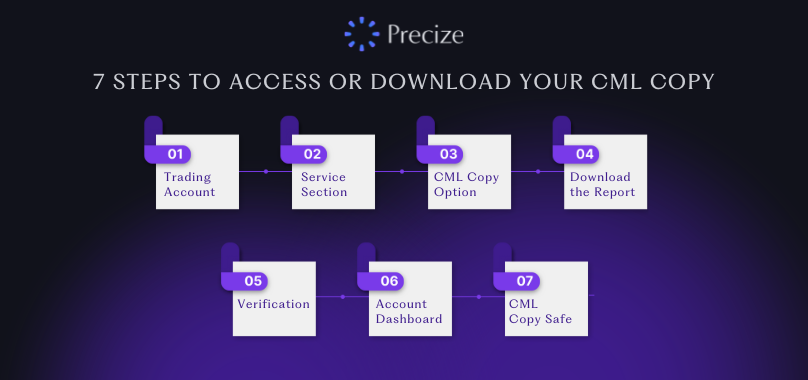
Accessing your CML copy is a simple process once you know where to look. Here are 7 steps to help you download it safely and quickly:
Step 1: Log in to Your Demat or Trading Account
Start by signing in to your broker’s website or mobile app using your client ID, username, and password. This ensures you are accessing your own account securely.
Step 2: Go to the Account or Service Section
Once logged in, navigate to menus or tabs like “Service,” “My Account,” “Profile,” or “Documents.” These sections usually contain all the account-related documents provided by your DP.
Step 3: Locate the CML Copy Option
Look for options labeled “CML Copy Request,” “Client Master Report (CMR),” or “Download CML/CMR Copy.” This is the section specifically meant for retrieving your Client Master List.
Step 4: Request or Download the Report
Click on “Request CML Copy” or “Download.” Some brokers may give you the option to receive the CML copy directly via your registered email, which adds convenience.
Step 5: Complete Any Verification
Certain platforms may ask for additional information, such as your PAN number or other identity details, to verify your request. This step ensures that the CML copy is delivered securely to the rightful account holder.
Step 6: Check Your Email or Account Dashboard
After completing the request, you can either download the digitally signed CML copy from your account dashboard or check your registered email for the document. Make sure to download it from official sources only.
Step 7: Keep the CML Copy Safe
Once you have the CML copy, store it securely. It contains important information like your Demat account number, PAN, bank account details, nominee information, and other sensitive account data. Treat it like an official account document.
Even after successfully downloading your CML copy, you might encounter some challenges that are easy to fix if you know how.
Common Issues with CML Copies and How to Solve Them
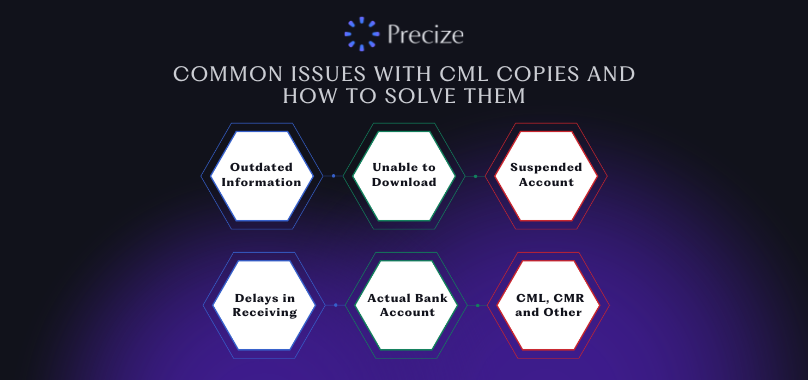
While accessing or using your CML copy, you might face a few common problems. Here is what to look out for and how to address them:
1. Incorrect or Outdated Information
Sometimes, your CML copy may show wrong details, such as an incorrect bank account number, PAN, or address. To fix this, contact your DP immediately and request an update. Ensure your KYC details are accurate and up to date with your DP.
2. Unable to Download the CML Copy
If you cannot download your CML copy from your broker or DP’s website/app, first check that your credentials (client ID, PAN, password) are correct. Some platforms only allow downloads 48 hours after account opening. If the problem continues, raise a customer service request with your broker.
3. Inactive or Suspended Account Status
Your CML copy shows whether your account is active, frozen, or suspended. If your account appears inactive but you expect it to be active, contact your DP to check the reason and resolve any pending compliance or documentation issues.
4. Delays in Receiving the Digitally Signed CML/CMR Copy
Brokers usually send the digitally signed CML copy via email within 1–2 days of your request. If it’s delayed, check your registered email inbox and spam folder. If it still hasn’t arrived, submit a service request with your DP or broker.
5. Mismatch Between CML Bank Details and Actual Bank Account
The bank account information in your CML copy must match your actual bank account. Any mismatch can create problems in dividend or fund transfers. Regularly verify the bank details in your CML copy and update your DP if there are discrepancies.
6. Confusion Between CML, CMR, and Other Documents
Brokers often use CML and CMR interchangeably. Both contain your Demat account details and serve similar purposes. When requesting the document, clearly specify whether you need a “CML copy” or a “CMR copy” to avoid confusion.