If you're a Zerodha user and need to obtain your Client Master Report (CMR), you've come to the right place.
A CMR is a crucial document that contains essential details about your trading and demat accounts, and getting your hands on it is straightforward. In this guide, we'll walk you through the steps to access your CMR from Zerodha's platform.
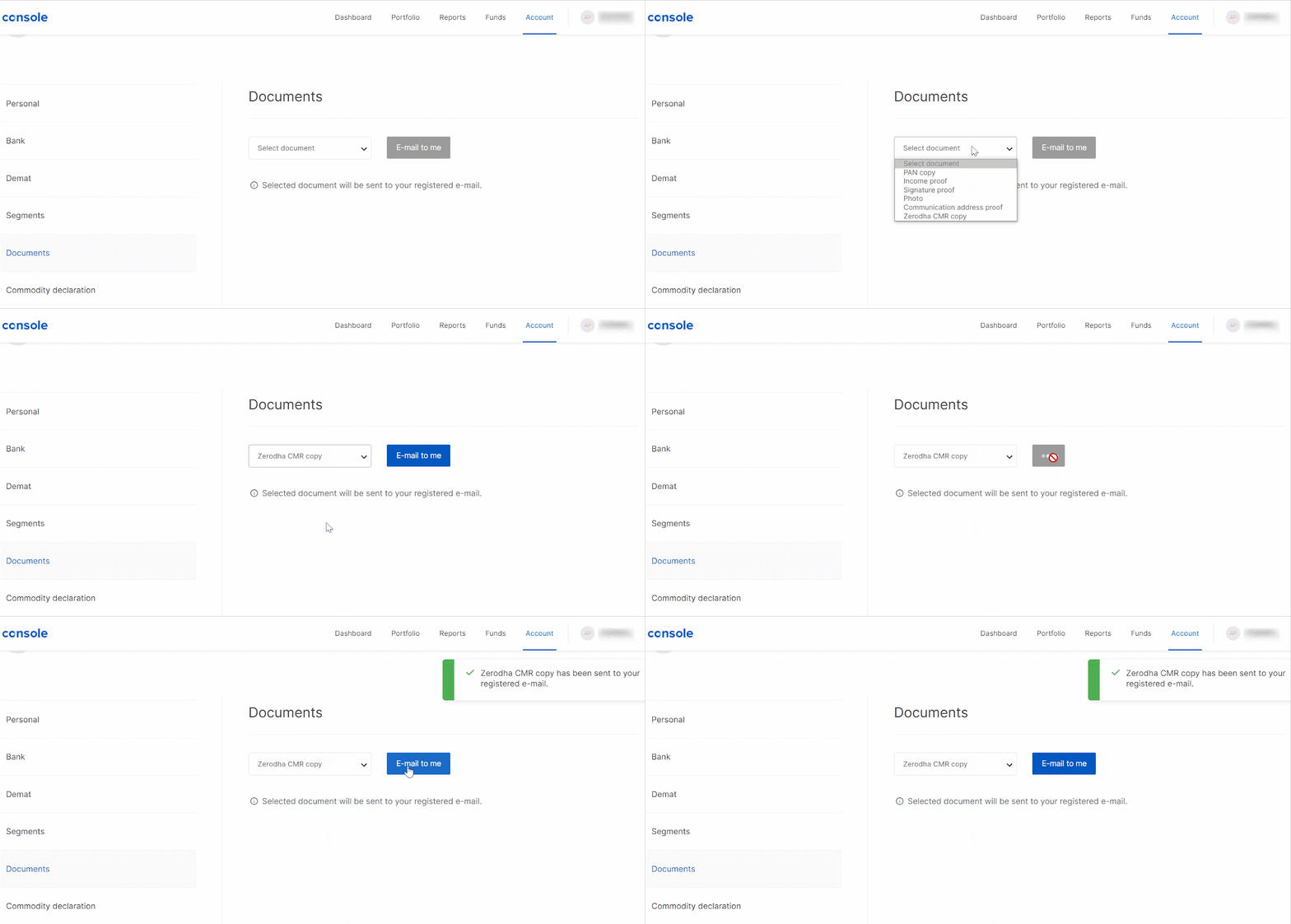
To access your Zerodha Client Master Report (CMR) online, follow these simple steps:
Visit the Zerodha Console by going to https://console.zerodha.com/dashboard.
Log in with your credentials.
Click on the "Account" tab.
In the "Account" section, locate and select "Documents."
Look for "Zerodha CMR copy" among the listed documents and click on it.
After clicking on the CMR document, you'll find an option to "E-mail to me." Click on this option.
This action will trigger Zerodha to send your CMR to your registered email address. Remember to check your email inbox to discover the CMR document ready for downloading or viewing.
Getting your hands on the Client Master Report (CMR) from Zerodha is as easy as a breeze and holds a wealth of information regarding your trading and demat accounts. This document serves as a valuable resource for all financial and regulatory matters. Therefore, there's no need for concern – just stick to the steps, and your CMR will be easily accessible, ready to assist whenever required! 🚀💼😄
Check out our blog post "What is CML/CMR and how to get it?" for an in-depth look into CMR.