
A trusted account in CDSL Easiest enables the authorized access of an individual, typically a family member or a trusted associate, to your online demat account.
How many trusted accounts can you add on CDSL Easiest?
Only four trusted accounts can be mapped at any given time. If you want to add a new account, then an existing account that is mapped should be deleted. The deletion request will be approved within 24 hours.
See How to Register for CDSL Easiest?
Follow these steps to add a trusted account to CDSL Easiest:
Visit web.cdslindia.com/myeasitoken/home/login to sign in.
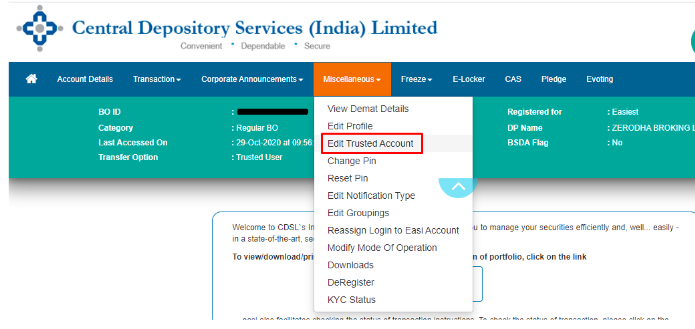
1. After selecting Miscellaneous, select Edit Trusted Account.
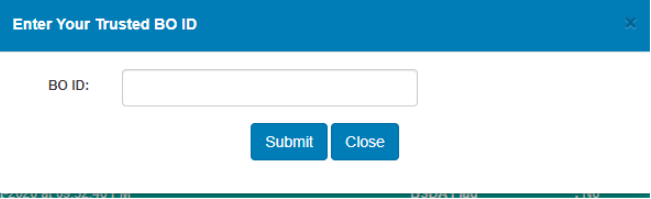
Enter the 16-digit CDSL BO ID where stocks must be transferred, and then click on submit.
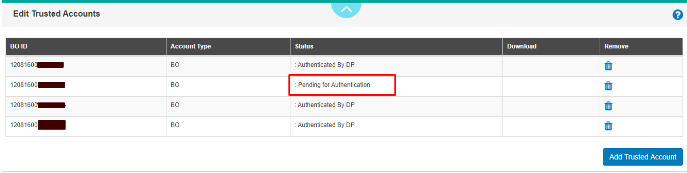
Wait for Approval: After submission, the approval from your DP (Depository Participant) is expected within 24 to 48 business hours.
How to delete a trusted account on CDSL Easiest?
To delete a trusted account on CDSL Easiest. The above steps remain almost the same except for a few changes in step 2. When you click on “Edit Trusted Account.”
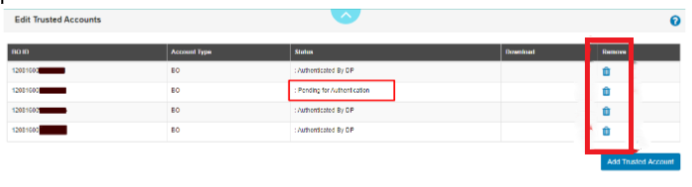
The list of all Trusted BO IDs that have already been added to the list (if any) is visible. By pressing the delete option, you can remove an existing account. Depending on your DP(Depository Participant), deletion will take between 24 and 48 working hours.
Now that you know the steps to add and delete a trusted account On CDSL Easiest, the purpose of this article is completed. I hope this helped to clear your doubts about CDSL Easiest.